Cryptocurrency trading often begins with two fundamental actions: buying and selling digital assets. OKX Exchange is one of the most popular global platforms for cryptocurrency trading, offering a broad range of supported assets, advanced tools, and flexible order types. This step-by-step guide walks you through exactly how to buy and sell cryptos on OKX — from creating an account to executing your first trade and managing your portfolio with confidence in 2026.
Broker Review Contents
What Is OKX Exchange?
OKX is a leading global cryptocurrency exchange that supports spot trading, derivatives (such as futures and options), staking, lending, and NFTs. It is designed for both newcomers and advanced traders, with a user-friendly interface, strong liquidity, and a wide range of supported coins, including Bitcoin (BTC), Ethereum (ETH), and many altcoins.
What You Need Before Buying and Selling Cryptos
Before trading on OKX, make sure you have:
- A verified OKX account (email/phone verified + KYC completed)
- A funded wallet with fiat or cryptocurrency
- A basic understanding of trading risks, fees, and market volatility
- A secure login and safety setup (2FA recommended)
Step-by-Step: How to Buy Cryptos on OKX
1. Create and Verify Your OKX Account
- Visit OKX.com and sign up using your email or phone number.
- Complete identity verification (KYC) to unlock higher deposit and withdrawal limits and to access fiat services.
- Activate two-factor authentication (2FA) for extra security.
2. Deposit Fiat or Cryptocurrency
You can fund your OKX account in two main ways:
A. Deposit Fiat (Cash)
- Go to Assets → Deposit → Fiat
- Select your currency (USD, EUR, etc.)
- Choose a payment method (bank transfer, card, or local options)
- Follow the instructions to complete the deposit
Note: Payment method availability depends on your country and local regulations.
B. Deposit Cryptocurrency
- Go to Assets → Deposit → Crypto
- Select the coin you want to deposit (e.g., BTC)
- Copy your OKX deposit wallet address
- Send crypto from your external wallet or another exchange
3. Navigate to Spot Trading
Once your funds are available:
- Select Trade → Spot
- Choose the trading pair (e.g., BTC/USDT if you want to buy Bitcoin using Tether)
4. Select Order Type
OKX supports several common order types:
- Market Order: Buy at the current market price (quickest execution)
- Limit Order: Set the price at which you want to buy
- Stop Order: Trigger a buy when price reaches a specified level
For beginners, market orders are typically the simplest way to buy cryptocurrency instantly.
5. Enter Trade Details
- Enter the amount of crypto you want to buy
- Review the total cost (including fees)
- Click Buy [Coin] to execute
Step-by-Step: How to Sell Cryptos on OKX
Selling cryptos on OKX follows a similar process.
1. Go to Spot Trading
- Go to Trade → Spot
- Select the correct trading pair (e.g., ETH/USDT if selling Ethereum for USDT)
2. Choose Order Type
- Market Order: Sell immediately at the current market price
- Limit Order: Set a price at which you want to sell
- Stop Order: Trigger a sell if price reaches a predefined level
If you want guaranteed execution right away, use a market order.
3. Enter Sell Details
- Enter the amount you want to sell
- Check the estimated proceeds (minus fees)
- Click Sell [Coin]
Once executed, the USDT or fiat equivalent will be credited to your OKX wallet.
How Fees Work When Buying and Selling on OKX
OKX uses a maker-taker fee model that varies based on your trading volume and whether you use OKX’s native token (OKB) to reduce fees.
Key points:
- Spot trading fees are charged on both buys and sells.
- Fees get lower as your 30-day trading volume increases.
- Using OKB can give additional fee discounts.
Always check your fee level in Account → Fee Tier before trading.
Important Order Types Explained
Market Order
Buys or sells immediately at the current market price.
Use when: You want fast execution.
Limit Order
Sets your preferred price. Only fills if the market reaches that price.
Use when: You want control over your entry or exit price.
Stop Loss Order
Automatically sells your crypto if price drops to a certain level — helps manage downside risk.
Take Profit Order
Automatically sells your crypto once price reaches your profit target.
Trailing Stop Order
Adjusts with price movement to lock in profits while limiting losses.
Tips for Safer Trading on OKX
1. Enable Security Features
- Two-factor authentication (2FA)
- Withdrawal whitelist
- Anti-phishing code
2. Start With Small Trades
If you are new to crypto, start with smaller positions until you understand market behavior.
3. Monitor Fees
Compare market and limit order fees. Limit orders placed below market price (maker orders) often have lower fees.
4. Use Stop Loss Orders
This helps automate exits and can prevent significant drawdowns.
How to Convert Crypto Back to Fiat
Once your crypto is in your OKX wallet, you can convert it back to fiat using:
A. Sell to Stablecoin (e.g., USDT)
- Execute a spot trade (e.g., BTC → USDT)
B. Withdraw Fiat to Your Bank or Payment Method
- Go to Assets → Withdraw → Fiat
- Choose currency and method
- Follow the instructions (may require additional verification)
Note: Fiat withdrawal options differ by country and local regulations.
Common Mistakes to Avoid
1. Ignoring Fees:
Fees for instant buy, market sell, and withdrawal can add up.
2. Trading Without a Plan:
Entering without targets or risk management increases emotional decisions.
3. Not Securing Your Account:
Failing to enable 2FA or withdrawal protection weakens security.
4. Using High Leverage (if available):
Leverage may amplify losses. For spot trading, leverage is usually not a factor — reserve those tools for advanced users only.
Why OKX Changed Its Name?
Bitcoin was still in its childhood as a network when OKEx team first began its crypto journey. Ethereum, the second biggest crytpo currency was still in its early days. Other public blockchains such as Solana, Dogecoin and applications were only ideas in a white paper. However, Bitcoin changed the game. BTC provided a vision for a new future, a really open system for every person in which every person has the freedom and they can truly own their own future.
OKX has a much bigger vision and they are constructing much more than a centralized exchange. Hence, they believe that It is time for them to modernise thier brand to represent accorodingly.
The OKX team believes that Finance (DeFi) and gaming (play-to-earn) are simply the tip of the iceberg. Hence, they decided to drop the E and replace it with X.
How To Create an account On OKX?
To buy cryptocurrency such as Bitcoin, you must first open an account with OKX exchange and verify your identity.
Fill out the form and click the sign up button. Now you must verify your email address or phone number with a code sent by OKExchange. This code is only valid for 30 minutes before expiring, requiring you to repeat the procedure.
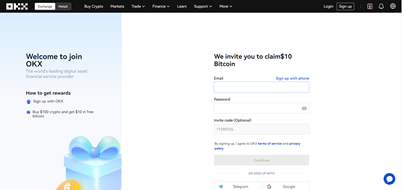
After inputting the code and validating your email address or phone number, you will be signed into your new OKX account. You will then be presented with a homepage.
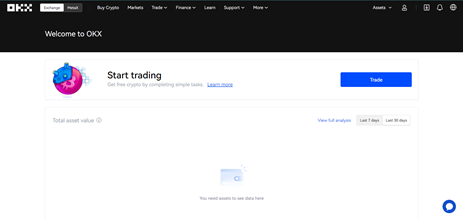
You can find further setting for account on OKX exchange page. How to buy and sell cryptocurrency on OKX Exchange?
Step 1: Log in to your OKX account
Before you may purchase or trade cryptocurrencies, you must first log into your OKX account. Go to the OKX website and select Login in the upper right corner to complete your login procedure.
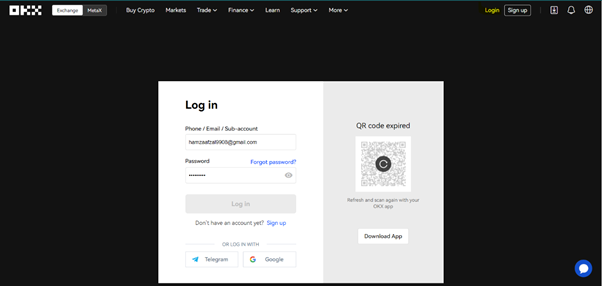
If you don’t already have an account, click Sign Up and fill out the form.
Step 2: Select Buy/Sell
To begin, log in to your OKX account and then choose Buy Crypto in the upper left-hand corner of the homepage.
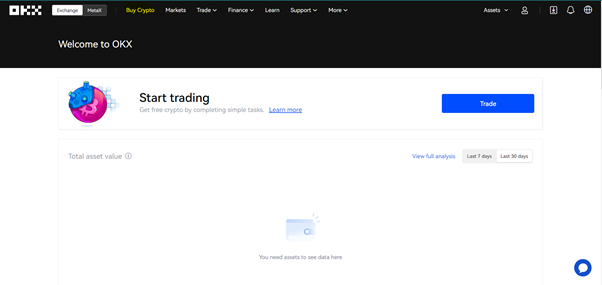
Buying or depositing crypto to fund your OKX account
OKX users have access to an easy-to-use Buy/Sell crypto gateway that allows them to purchase nine different crypto assets, including, and, using a range of local fiat currencies.
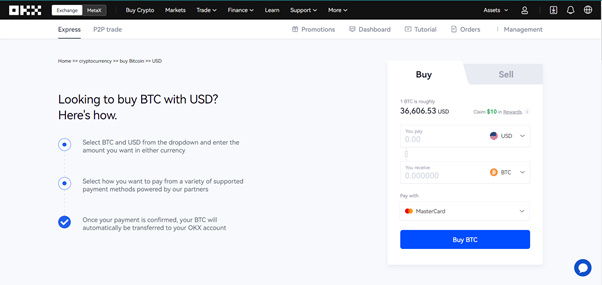
Step 3: How to Buy and Sell Cryptocurrency On OKX Exchange? – Select your Buy/Sell method
Three steps are to decide how you want to purchase or sell bitcoin. On OKX, you have three main choices:
1. Fast Trade
2. Peer-to-peer trading
3. Block Trade
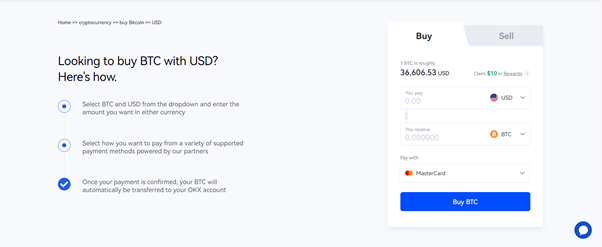
The simplest way to buy crypto on OKX Exchange is to utilize the Fast Trade option.
Conclusion
Buying and selling cryptos on OKX in 2026 is designed to be straightforward yet powerful, with options that suit beginners and advanced traders alike. The platform’s combination of spot markets, advanced order types, and robust security protocols makes it a strong choice for active crypto traders and long-term investors.
By following the steps above — from account setup to secure trading and risk management — you can confidently navigate OKX’s ecosystem and execute buy and sell orders with precision and clarity.